

UTM Parameters for Beginners: Track Every Marketing Dollar (Step-by-Step Guide 2026)
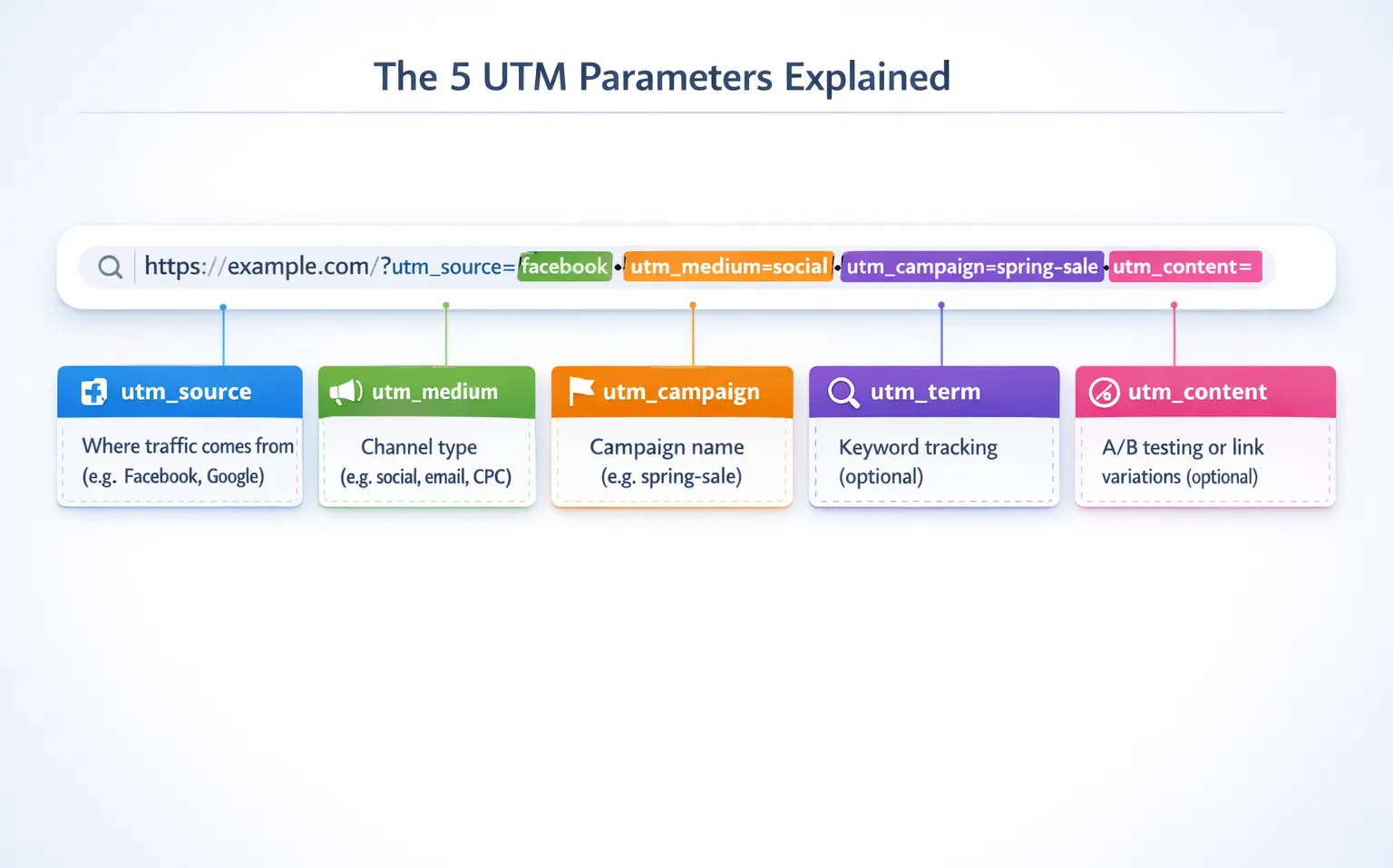
UTM parameters are tracking codes you add to your marketing links that tell Google Analytics exactly where your traffic comes from, so you can see which campaigns, ads, or social posts drive the most clicks, conversions, and revenue.
Instead of guessing which marketing dollars work, UTM tracking shows you the exact path from click to customer.
TL;DR
UTM parameters are 5 simple tags (source, medium, campaign, term, content) added to your URLs to track marketing performance
They work automatically with Google Analytics 4 to show which specific ads, emails, or posts generate results
Use a UTM builder tool to create consistent tracking links in under 60 seconds without coding
Clean UTM naming conventions prevent data chaos (use lowercase, hyphens, no spaces)
Combine UTM tracking with branded short links to boost click-through rates by 30% while maintaining full analytics
What Are UTM Parameters (And Why Should You Care)?

UTM parameters are tracking codes added to your URLs that tell Google Analytics exactly where each visitor came from. Think of them as invisible name tags for every marketing link you share.
Without UTM Tracking: You are Flying Blind
Here's the problem most marketers face:
You post a link on LinkedIn, send the same link in an email newsletter, and run it as a Facebook ad. Your website analytics shows 300 visits, but you have zero clue which channel delivered results.
You cannot answer basic questions like:
Which platform drove the most traffic?
Which channel generated actual conversions?
Where should you spend more budget next month?
This is expensive guesswork.
With UTM Parameters: You Know Exactly What Works
Now your Google Analytics dashboard shows this level of campaign tracking detail:
| Traffic Source | Clicks | Conversions | Cost Per Conversion |
|---|---|---|---|
| 45 | 8 | $12.50 | |
| Email Newsletter | 180 | 22 | $2.27 |
| Facebook Ads | 75 | 3 | $25.00 |
The insight: Email delivers 2.75x more conversions than LinkedIn and 7.3x more than Facebook ads at one-fifth the cost.
This is the power of combining short link analytics with UTM tracking to measure true campaign performance.
The 5 UTM Parameters Explained (With Real Examples)

UTM tracking uses five parameters. Three are required, two are optional.
Required Parameters
1. utm_source
Identifies where traffic originates.
Examples: facebook, google, newsletter, linkedin
Use case: Separate Instagram traffic from TikTok traffic
2. utm_medium
Defines the marketing channel type.
Examples: social, email, cpc, affiliate, referral
Use case: Compare paid ads vs organic social posts
3. utm_campaign
Names your specific marketing campaign.
Examples: spring-sale-2026, product-launch, webinar-promo
Use case: Track performance of your Q1 sale vs Q2 sale
Optional Parameters
4. utm_term
Tracks paid search keywords (mainly for Google Ads).
Examples: project-management-software, best-crm-tools
Use case: See which keywords convert best
5. utm_content
Differentiates similar content or links in the same campaign.
Examples: blue-cta-button, hero-image-link, sidebar-banner
Use case: A/B test two different email CTAs
How to Build Your First UTM Link in 3 Minutes

You have two options: manual entry or UTM builder tools. Smart marketers use builders to avoid typos and maintain consistency.
Step 1: Gather Your Campaign Details
Before building links, answer these questions:
What is the destination URL? (Where should people land?)
Which platform will share this link? (Facebook, email, Google Ads?)
What is the campaign name? (Product launch? Holiday sale?)
What type of content is this? (Banner ad? Newsletter? Instagram story?)
Step 2: Use a UTM Builder Tool
Instead of manually typing parameters, use a UTM builder like the one at simpleurl.tech/utm-builder. These tools:
Auto-format parameters correctly (no spaces or capitals)
Generate shortened branded links automatically
Save your naming conventions for team consistency
Let you copy ready-to-use links instantly
Example workflow:
Paste your landing page URL
Fill in source (facebook), medium (social), campaign (spring-launch)
Click generate
Copy your tracked link: simpleurl.tech/spring-launch
If you are completely new to URL shorteners, check out our beginner's guide explaining how URL shorteners work before building your first tracked link.
Step 3: Test Before Publishing
Always click your UTM link and check two things:
Does it land on the correct page?
Do the parameters appear in your analytics within 24 hours?
This 10-second test prevents tracking failures that waste ad spend.
UTM Naming Conventions That Prevent Analytics Chaos

Poor naming ruins your data. Here is how to keep campaigns organized.
Universal Rules
Use lowercase only
Good: facebook
Bad: Facebook, FACEBOOK
Replace spaces with hyphens
Good: holiday-sale-2026
Bad: holiday sale 2026, holiday_sale_2026
Be consistent across campaigns
Pick one naming style and document it
Share naming guidelines with your team
Real World Example
Messy tracking:
utm_source=Facebook
utm_source=facebook
utm_source=FB
Your analytics now shows three separate traffic sources for the same platform. You just fragmented your data.
Clean tracking:
- utm_source=facebook (always)
All Facebook traffic consolidates into one clear report.
Where to Use UTM Parameters (9 Essential Places)
UTM tracking works anywhere you share links online.
1. Social Media
Instagram bio links
LinkedIn post links
TikTok video descriptions
Twitter profile links
YouTube video descriptions
2. Paid Advertising
Facebook Ads
Google Ads (combine with auto-tagging)
LinkedIn Sponsored Content
Display banner ads
3. Email Marketing
Newsletter links
Automated email sequences
Promotional campaign emails
4. Other Channels
Influencer partnerships
Affiliate marketing links
Guest blog posts
Podcast show notes
QR codes on print materials
The more channels you track, the clearer your ROI picture becomes.
For platform-specific strategies and real campaign examples, see our guide on smart ways to use branded short links across different marketing channels.
How to Read UTM Data in Google Analytics 4

Creating UTM links is step one. Reading the data is where money-making insights live.
Where to Find UTM Reports
In Google Analytics 4:
Navigate to Reports → Acquisition → Traffic Acquisition
Look for rows showing your campaign names
Click any campaign to see source and medium breakdown
Check conversion metrics on the right side
Key metrics to watch:
Users (how many people clicked)
Sessions (total visits from this campaign)
Engagement rate (quality of traffic)
Conversions (goal completions)
Revenue (if e-commerce tracking is enabled)
Turning Data Into Decisions
Scenario: Your spring sale campaign runs on three channels.
| Source | Medium | Clicks | Conversions | Cost Per Conversion |
|---|---|---|---|---|
| social | 450 | 12 | $8.33 | |
| 280 | 45 | $1.22 | ||
| cpc | 190 | 8 | $18.75 |
The insight: Email delivers conversions at 15x lower cost than Google Ads. You should increase email frequency and test reducing Google ad spend.
This is exactly the kind of clarity UTM tracking provides. Learn more about turning link analytics into actionable marketing decisions with our advanced analytics guide.
Common UTM Mistakes That Waste Marketing Budget
Mistake 1: Inconsistent Naming
Using "email" in one campaign and "Email_Newsletter" in another fragments your data. Pick standard names and stick to them.
Mistake 2: Not Tracking Internal Links
UTM parameters track external sources only. Never use them for internal website navigation or you will overwrite original traffic sources.
For internal team collaboration, use private short links or internal go links instead.
Mistake 3: Using Spaces or Special Characters
Spaces break links. Always use hyphens for readability and compatibility.
Mistake 4: Forgetting Mobile Traffic
Mobile users account for 60% of web traffic in 2026. Test all UTM links on mobile devices before launching campaigns.
Mistake 5: Not Documenting Campaigns
Create a simple spreadsheet logging every campaign with its UTM structure. This prevents confusion when analyzing data months later.
Why Branded Short Links Make UTM Tracking Better
Long UTM URLs look ugly and suspicious. Compare these:
Generic UTM link:
Branded short link:
simpleurl.tech/spring-sale
Both track identically in analytics, but the short version:
Increases click-through rates by 30-39% compared to generic shortened URLs
Builds brand recognition with every share
Fits cleanly in social media posts
Looks professional in email signatures
Still captures all UTM data
Modern UTM builders automatically create branded short links alongside full tracking URLs, giving you the best of both worlds.
Getting Started With UTM Tracking Today
You do not need expensive tools or technical skills to start tracking campaigns properly.
Your 3-step action plan:
Define your naming standards (15 minutes)
Choose lowercase format
List your traffic sources (facebook, google, email)
List your mediums (social, cpc, email, referral)
Build your first tracked link (5 minutes)
Visit a free UTM builder tool like simpleurl.tech/utm-builder
Create one link for your next social post
Test it before publishing
Check your analytics (48 hours later)
Open Google Analytics 4
Find your campaign in Traffic Acquisition
Verify data appears correctly
Once you see your first campaign data populate, you will never post an untracked link again. The clarity is addictive.
New to link tracking? Our complete getting started guide walks you through setting up your account, creating your first branded domain, and building trackable links in under 10 minutes.
Start Tracking Smarter, Not Harder
UTM parameters transform marketing from guesswork into science. Every link becomes a data point. Every campaign becomes measurable. Every marketing dollar gets accountability.
Ready to build your first tracked link? Head to simpleurl.tech/utm-builder and create a campaign-tracked URL in under 60 seconds. Your future self will thank you when it is time to prove marketing ROI.
What campaign will you track first? Start with your highest-traffic channel and work from there.
Frequently Asked Questions
1. Do UTM Parameters Affect SEO or Search Rankings?
No, UTM parameters do not affect your SEO or search engine rankings. Google treats URLs with UTM codes the same as the original URL for indexing purposes. However, avoid using UTM parameters on internal links within your website, as this can interfere with your traffic attribution data in Google Analytics.
2. Are UTM Parameters Case Sensitive?
Yes, UTM parameters are case sensitive. Google Analytics treats "Facebook," "facebook," and "FACEBOOK" as three separate traffic sources, which fragments your data. Always use lowercase letters for consistency and accurate reporting. The best practice is to establish naming conventions (like "facebook" and "linkedin") and document them for your entire team.
3. Can I Use UTM Parameters with Shortened URLs?
Yes, UTM parameters work perfectly with shortened URLs. Modern URL shorteners like SimpleURL preserve all UTM tracking data while creating clean, branded short links. The UTM codes remain attached to the destination URL, so your Google Analytics still captures complete campaign tracking information.
4. What Happens If I Forget to Add UTM Parameters to My Campaign Links?
If you forget UTM parameters, your traffic will still appear in Google Analytics but will be categorized as "direct" or misattributed to the wrong source. You will not be able to identify which specific campaign, ad, or post drove those visits.
5. How Many UTM Parameters Should I Use for Each Link?
At minimum, use the three required parameters: utm_source, utm_medium, and utm_campaign. This gives you basic campaign tracking. Add utm_content for A/B testing different ad creatives or email CTAs, and utm_term for tracking paid search keywords in Google Ads campaigns.


